
Explore and Build a test dataset with LangSmith#
In this notebook we are going to explore the basecamp handbook and generate a synthetic testset for it. We will be using the Synthetic Test Set generation feature of ragas to generate a testset and then use Langsmith to review and store the dataset.
Lets get started by exploring the basecamp handbook and then generating a testset for it.
# so that changes to the code are automatically reloaded
# ignore if not modifying ragas code directly
%load_ext autoreload
%autoreload 2
!tree data/
data/
├── 37signals-is-you.md
├── benefits-and-perks.md
├── code-of-conduct.md
├── faq.md
├── getting-started.md
├── how-we-work.md
├── international-travel-guide.md
├── LICENSE.md
├── making-a-career.md
├── managing-work-devices.md
├── moonlighting.md
├── our-internal-systems.md
├── our-rituals.md
├── performance-plans.md
├── product-histories.md
├── README.md
├── stateFMLA.md
├── titles-for-data.md
├── titles-for-designers.md
├── titles-for-ops.md
├── titles-for-programmers.md
├── titles-for-support.md
├── vocabulary.md
├── what-influenced-us.md
├── what-we-stand-for.md
└── where-we-work.md

0 directories, 26 files
Generate Synthetic Test Set#
Using Langsmith and Ragas, we outline a straightforward workflow to generate your initial dataset. This dataset can then be utilized to systematically measure and enhance the RAG pipeline’s performance. The steps are as follows:
Load the data as documents. ⏳
Generate the test set from these documents. ⏳
Upload and verify the test set with Langsmith. ⏳
Formulate experiments to improve you RAG pipeline. ⏳
Choose the right metrics to evaluate the experiment ⏳
Analyze the results using the Langsmith dashboard. ⏳
We’ll cover 1 to 3 in this notebook and show you 4 to 6 in the next one
1. Load the data#
Using langchain document loader we can load the documents from the directory. We loop through the documents to add file_name as metadata. This will help Ragas in the testset generation process.
# 1. Load the data as documents
from langchain.document_loaders import DirectoryLoader
loader = DirectoryLoader("./data/")
documents = loader.load()

# add filename as metadata
for document in documents:
    document.metadata['file_name'] = document.metadata['source']

docs = documents
# how many docs do we have
len(docs)
26
2. Generate the testset#
Ragas has the Synthetic Test Set generation module to help you create an initial dataset. You can read more about the internals and how it works here.
# 2. Generate the testset
from ragas.testset.generator import TestsetGenerator
from ragas.testset.evolutions import simple, reasoning, multi_context

# generator with openai models
generator = TestsetGenerator.with_openai()

# generate testset
testset = generator.generate_with_langchain_docs(
    documents,
    test_size=50,

    # we can specify the distribution of the different types of questions
    distributions={simple: 0.5, reasoning: 0.25, multi_context: 0.25}
)
Filename and doc_id are the same for all nodes.
you can view it as a pandas dataframe
test_df = testset.to_pandas()
test_df.head()
| question | contexts | ground_truth | evolution_type | episode_done | |
|---|---|---|---|---|---|
| 0 | What is the importance of levelheadedness in t... | [What We Stand For\n\nValues\n\nBefore anythin... | Levelheadedness is important in the company's ... | simple | True |
| 1 | How does 37signals track and recognize career ... | [Making A Career\n\nYour First 90 Days\n\nCong... | 37signals tracks and recognizes career progres... | simple | True |
| 2 | What is the significance of limiting the work ... | [als better.\n\nAs soon as organizational bott... | Limiting the work week to 40 hours helps prior... | simple | True |
| 3 | What options are available for working remotel... | [Where We Work\n\nFrom home\n\nMost people at ... | Working from coffee shops or other third space... | simple | True |
| 4 | What types of bugs do you fix for your legacy ... | [Frequently Asked Questions\n\nWhere should I ... | We do fix any security or privacy related bugs... | simple | True |
3. Upload and verify the testset with Langsmith#
The synthetic dataset need to be manually reviewed to ensure that is matches the kinds of questions your users might ask. This is a point in this workflow that needs human feedback. We are working on algorithms and techniques to minimize it but for now it is a necessary step.
Langsmith is a great tool to review and store your datasets. It has a simple interface to review the dataset and then store it in a way that it can be used for future experiments.
You can directly use the ragas integration to upload the dataset to langsmith or check the docs on how to do it with the langsmith client.
from ragas.integrations.langsmith import upload_dataset

dataset_name = "basecamp"
dataset_desc = "Synthetic testset data for basecamp"

dataset = upload_dataset(testset, dataset_name, dataset_desc)
Created a new dataset 'basecamp'. Dataset is accessible at https://smith.langchain.com/o/9bfbddc5-b88e-41e5-92df-2a62f0c64b4b/datasets/e9dc7bc8-9d47-4efd-8f4c-678a18a7aef5
Now lets verify it with LangSmith.
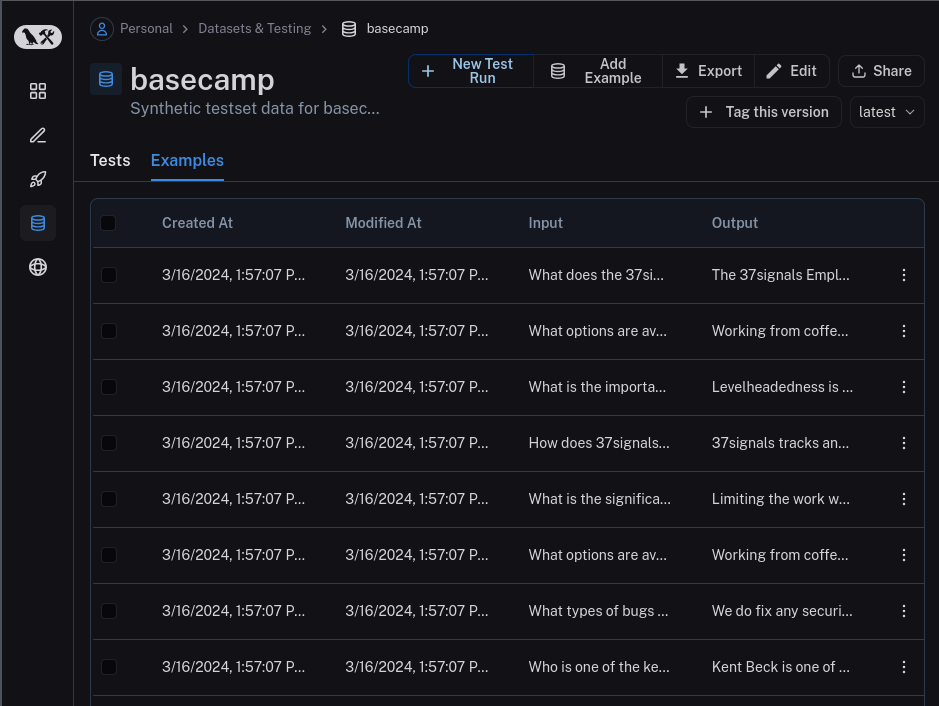
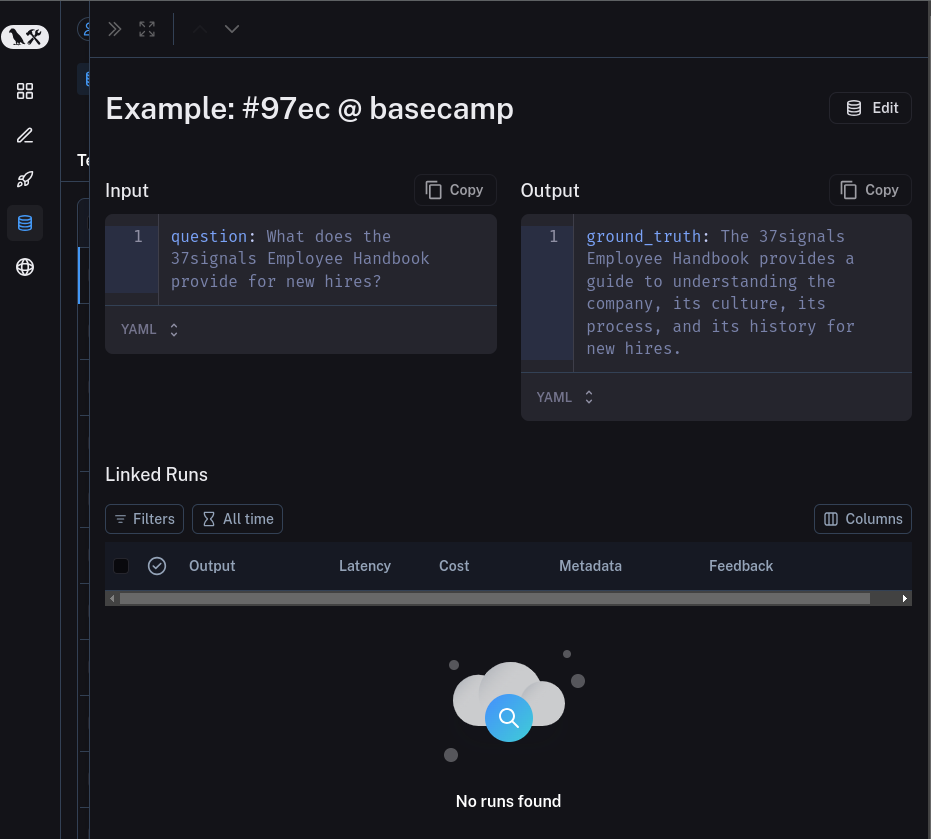
What is event better is that langsmith gives you an interface to manually review the dataset which involves:
Eye-ball each row and see if everything is correct
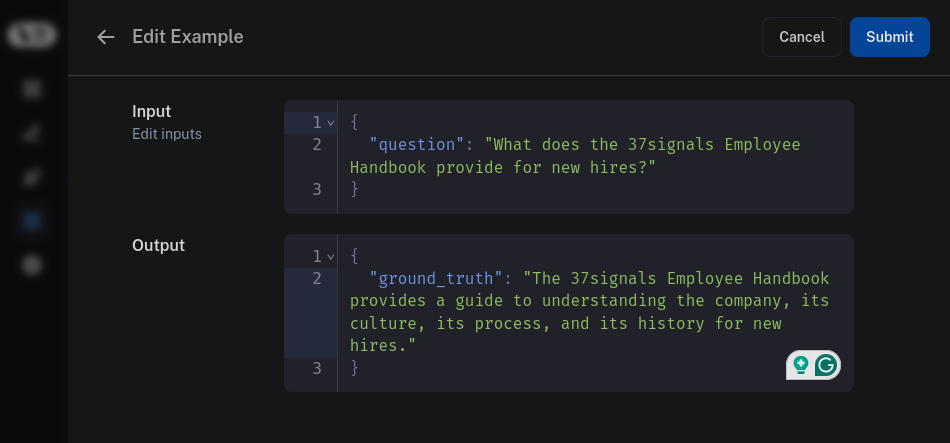
If not correct, you can edit the row and then save it or select the row and remove it from the datasets.
This is a time consuming process but it is necessary to ensure that the dataset is of high quality. If not done the evaluations we do later will not be accurate. Also you are the best judge for your usecase and hence it is important to review the dataset.
Now that we have a test dataset generated and reviewd we can move on to
Conduct evaluations using Ragas metrics for various experiments.
Analyze the results using the Langsmith dashboard.
Let’s explore than in this notebook