
Build a Baseline with Langchain#
Having prepared a test dataset, we are now equipped to conduct experiments and iteratively enhance our RAG pipelines.
Introducing Evaluation Driven Development (EDD)#
A key challenge is developing a systematic approach to measure and refine our RAG pipeline. To address this, we propose Evaluation Driven Development (EDD), inspired by the popular Test Driven Development methodology. EDD advocates for employing various metrics to assess different facets of the LLM application and conducting targeted experiments for improvement based on specific use cases.
Evaluation Driven Development (EDD) offers a structured framework to tackle the complexities involved in optimizing RAG applications. Below is a mind map created by an engineer at AWS, illustrating potential strategies for enhancing a RAG pipeline.

The original Miro mind map is accessible for further exploration. EDD serves as a guiding light through the complexity of enhancing RAG applications.
Let’s proceed to see EDD in action.
%%capture --no-stderr
%pip install -U "unstructured[md]" chromadb langchain_openai langchainhub
import os
import getpass

os.environ["LANGCHAIN_API_KEY"] = getpass.getpass("LANGCHAIN_API_KEY")
os.environ["OPENAI_API_KEY"] = getpass.getpass("OPENAI_API_KEY")
Building a baseline#
if you remember, in the last notebook we outline the steps and addressed a few
Load the data as documents. ✅
Generate the test set from these documents. ✅
Upload and verify the test set with Langsmith. ✅
Formulate experiments to improve you RAG pipeline. ⏳
Choose the right metrics to evaluate the experiment ⏳
Analyze the results using the Langsmith dashboard. ⏳
So lets continue where we left off.
4. Formulate experiments to improve your RAG pipeline#
Now for the baseline first thing we want to know is how effective is vanila GPT-3.5 compared to RAG based model. RAG should be superiour because there is specific information about companies but what exactly is the difference?
is RAG better than just using an LLM for our case?
In order to compare that need to create 2 chains
Just LLM - gpt-3.5
LLM + Retriver
Building the RAG#
from langchain.text_splitter import RecursiveCharacterTextSplitter
from langchain_community.vectorstores import Chroma
from langchain_core.output_parsers import StrOutputParser
from langchain_core.runnables import RunnablePassthrough
from langchain_openai import ChatOpenAI, OpenAIEmbeddings
To build the RAG lets load the data, chunk it and add it to a vector store for retrieval. If you want more info on how to build RAG systems with langchain, check the docs
# load the documents
from langchain.document_loaders import DirectoryLoader

loader = DirectoryLoader("./data/")
documents = loader.load()

# add filename as metadata
for document in documents:
    document.metadata["file_name"] = document.metadata["source"]

# how many docs do we have?
docs = documents
len(docs)
26
from langchain.text_splitter import RecursiveCharacterTextSplitter
from langchain_openai import OpenAIEmbeddings
from langchain_community.vectorstores import Chroma

text_splitter = RecursiveCharacterTextSplitter(chunk_size=1000, chunk_overlap=200)
splits = text_splitter.split_documents(docs)

# create the vector store
vectorstore = Chroma.from_documents(documents=splits, embedding=OpenAIEmbeddings())
# get one example question for the dataset for testing
from langsmith import Client

client = Client()
examples = list(client.list_examples(dataset_name="basecamp"))

q = examples[0].inputs
q
{'question': 'What does the 37signals Employee Handbook provide for new hires?'}
from operator import itemgetter

from langchain_core.output_parsers import StrOutputParser
from langchain_core.prompts import ChatPromptTemplate
from langchain_core.runnables import RunnableLambda, RunnablePassthrough
from langchain_openai import ChatOpenAI
from langchain import hub
# Retrieve and generate using the relevant snippets from the docs
vectorstore_retriever = vectorstore.as_retriever()
# load a RAG prompt from Langchain HUB
prompt = hub.pull("rlm/rag-prompt")
# our llm of choice
llm = ChatOpenAI(model_name="gpt-3.5-turbo", temperature=0)


def format_docs(docs):
    return "\n\n".join(doc.page_content for doc in docs)


def ragas_output_parser(docs):
    return [doc.page_content for doc in docs]
Now lets string together all the components together and make the RAG pipeline
from langchain_core.runnables import RunnableParallel

generator = prompt | llm | StrOutputParser()

retriever = RunnableParallel(
    {
        "context": vectorstore_retriever | format_docs,
        "question": RunnablePassthrough(),
    }
)

filter_langsmith_dataset = RunnableLambda(
    lambda x: x["question"] if isinstance(x, dict) else x
)

rag_chain = RunnableParallel(
    {
        "question": filter_langsmith_dataset,
        "answer": filter_langsmith_dataset | retriever | generator,
        "contexts": filter_langsmith_dataset
        | vectorstore_retriever
        | ragas_output_parser,
    }
)
# check with the example question to see if everything is working
get_answer = RunnableLambda(lambda x: x["answer"])
resp = (rag_chain | get_answer).invoke(q)
resp
"The 37signals Employee Handbook provides guidance and clarity for new hires, helping them navigate the company's unique practices. It ensures that new employees feel supported and informed during their onboarding process. Prior to the handbook, new hires felt lost and isolated, making their first weeks or months stressful."
Voilà! We have our RAG working with Langchain. Go on and try a few questions yourself from the examples we generated.
Now, let’s build the LLM.
Just the LLM#
Setting this up is much easier as you could imagine, all you need are the prompts.
from langchain_core.prompts import PromptTemplate

template = """Use the following pieces of context to answer the question at the end.
If you don't know the answer, just say that you don't know, don't try to make up an answer.
Use three sentences maximum and keep the answer as concise as possible.
Always say "thanks for asking!" at the end of the answer.

Question: {question}

Helpful Answer:"""
llm_prompt = PromptTemplate.from_template(template)

just_llm = (
    {"question": RunnablePassthrough()}
    | llm_prompt
    | llm
    | StrOutputParser()
    | RunnableParallel(
        {
            "answer": RunnablePassthrough(),
            "contexts": RunnableLambda(lambda _: [""]),
        }
    )
)
resp = (just_llm | get_answer).invoke(q)
resp
"The 37signals Employee Handbook provides information on the company's values, culture, and expectations for new hires. It also outlines policies and procedures to help employees navigate their roles within the organization. Thanks for asking!"
Try out a few examples from this chain also, see if you can spot any differences in performance by eyeballing the results.
5. Choose the right metrics to evaluate the experiment#
Ragas provides you with a different metrics that you can use to measure the different components of your RAG pipeline. You can see the entire list in the docs.
For this experiment we are going to choose Answer Correctness. Answer Correctness is an end-to-end metric that measures the accuracy of the generated answer when compared to the ground truth. This evaluation relies on the ground truth and the answer, with scores ranging from 0 to 1. A higher score indicates a closer alignment between the generated answer and the ground truth, signifying better correctness. Do check out the docs to learn more about how it works internally.
To make evaluation of Langchain chains on Langsmith easier, Ragas provides you with 2 utils
EvaluatorChain: which is a langchain chain that take a Ragas metric and creates aChainwhich outputs the score.evaluate(): this is a util function for Langsmith that takes a dataset_name, chain and metrics to run the evaluations.
Lets take a look at both of them.
EvaluatorChain#
Lets create one for Answer Correctness and evaluate both of the baselines we created
from ragas.integrations.langchain import EvaluatorChain

# the metric we will be using
from ragas.metrics import answer_correctness
evaluate() Langsmith Dataset#
this utility function take the Langsmith dataset_name, RAG chain, the Ragas metrics you choose and runs the evaluations for you.
from ragas.integrations.langsmith import evaluate
Lets evaluate the rag_chain first.
dataset_name = "basecamp"
# evaluate just llms
run = evaluate(
    dataset_name=dataset_name,
    llm_or_chain_factory=rag_chain,
    experiment_name="rag_chain_1",
    metrics=[answer_correctness],
    verbose=True,
)
View the evaluation results for project 'stupendous-mark-31' at:
https://smith.langchain.com/o/9bfbddc5-b88e-41e5-92df-2a62f0c64b4b/datasets/e9dc7bc8-9d47-4efd-8f4c-678a18a7aef5/compare?selectedSessions=69365437-afc2-4d0c-86ac-42f7d24654b7

View all tests for Dataset basecamp at:
https://smith.langchain.com/o/9bfbddc5-b88e-41e5-92df-2a62f0c64b4b/datasets/e9dc7bc8-9d47-4efd-8f4c-678a18a7aef5
[>                                                 ] 0/50
/home/jjmachan/.pyenv/versions/3.10.12/envs/notes/lib/python3.10/site-packages/langchain_core/_api/deprecation.py:117: LangChainDeprecationWarning: The function `__call__` was deprecated in LangChain 0.1.0 and will be removed in 0.2.0. Use invoke instead.
  warn_deprecated(
[------------------------------------------------->] 50/50
Experiment Results:
| feedback.answer_correctness | error | execution_time | run_id | |
|---|---|---|---|---|
| count | 50.000000 | 0 | 50.000000 | 50 |
| unique | NaN | 0 | NaN | 50 |
| top | NaN | NaN | NaN | a46fc47d-fc6d-4278-ac58-a65746b66eb0 |
| freq | NaN | NaN | NaN | 1 |
| mean | 0.521026 | NaN | 2.498635 | NaN |
| std | 0.161262 | NaN | 0.822136 | NaN |
| min | 0.180171 | NaN | 1.508961 | NaN |
| 25% | 0.446578 | NaN | 1.902223 | NaN |
| 50% | 0.535243 | NaN | 2.215940 | NaN |
| 75% | 0.616183 | NaN | 2.777203 | NaN |
| max | 0.845058 | NaN | 4.818254 | NaN |
Now lets evaluate the RAG pipeline
# evaluate rag_chain
run = evaluate(
    dataset_name=dataset_name,
    llm_or_chain_factory=just_llm,
    experiment_name="just_llm_1",
    metrics=[answer_correctness],
    verbose=True,
)
View the evaluation results for project 'worthwhile-connection-73' at:
https://smith.langchain.com/o/9bfbddc5-b88e-41e5-92df-2a62f0c64b4b/datasets/e9dc7bc8-9d47-4efd-8f4c-678a18a7aef5/compare?selectedSessions=5eb768e6-7f39-4d15-8413-89cb525e868f

View all tests for Dataset basecamp at:
https://smith.langchain.com/o/9bfbddc5-b88e-41e5-92df-2a62f0c64b4b/datasets/e9dc7bc8-9d47-4efd-8f4c-678a18a7aef5
[------------------------------------------------->] 50/50
Experiment Results:
| feedback.answer_correctness | error | execution_time | run_id | |
|---|---|---|---|---|
| count | 50.000000 | 0 | 50.000000 | 50 |
| unique | NaN | 0 | NaN | 50 |
| top | NaN | NaN | NaN | 0d67a0b4-cddc-4e1f-81ec-72fa2dd204d8 |
| freq | NaN | NaN | NaN | 1 |
| mean | 0.477671 | NaN | 1.784664 | NaN |
| std | 0.192345 | NaN | 1.272940 | NaN |
| min | 0.177440 | NaN | 0.813902 | NaN |
| 25% | 0.258132 | NaN | 1.245208 | NaN |
| 50% | 0.517662 | NaN | 1.503279 | NaN |
| 75% | 0.606184 | NaN | 1.830282 | NaN |
| max | 0.962720 | NaN | 9.698655 | NaN |
Now you can check you langsmith dataset dashboard to view and analyise the results.
6. Analyze the results using the Langsmith dashboard#
The cool thing about Langsmith is that it provides a good UI to visualize the results and dig deeper into them if needed. In this section, we will do exactly that.
If you open up the Datasets & Testing tab and choose the dataset you uploaded, you will be able to see the different runs.

Here you can see the 2 experiments we ran: “just_llm” and “rag_chain”. You can select the runs you want to compare against to dive deeper. You can also choose different measurements Langsmith provides like P50 Latency, P99 Latency, Cost, Error Rate, and the metrics Ragas provides, in our case, Answer Correctness. We can see a high-level overview of the score here.

As you can see, RAG is in fact better than Just_LLM, which makes sense because the contexts we provide have more information than what the model alone might know. But let’s keep digging deeper. I want to see the different rows and the individual scores for each. Luckily, Langsmith makes reviewing this super simple.

This makes it easier to review each of the rows and compare outputs side by side and see the Answer Correctness score for each row. As you manually go through the results, you might notice patterns in the different runs, and you can click through and see more. You can also open the corresponding Langchain runs to debug even further.

Last but not least, because Ragas metrics runs are also logged, you can click through the score and see the trace for Answer Correctness. This helps make Ragas scores explainable, and you can understand why you got the scores you got.
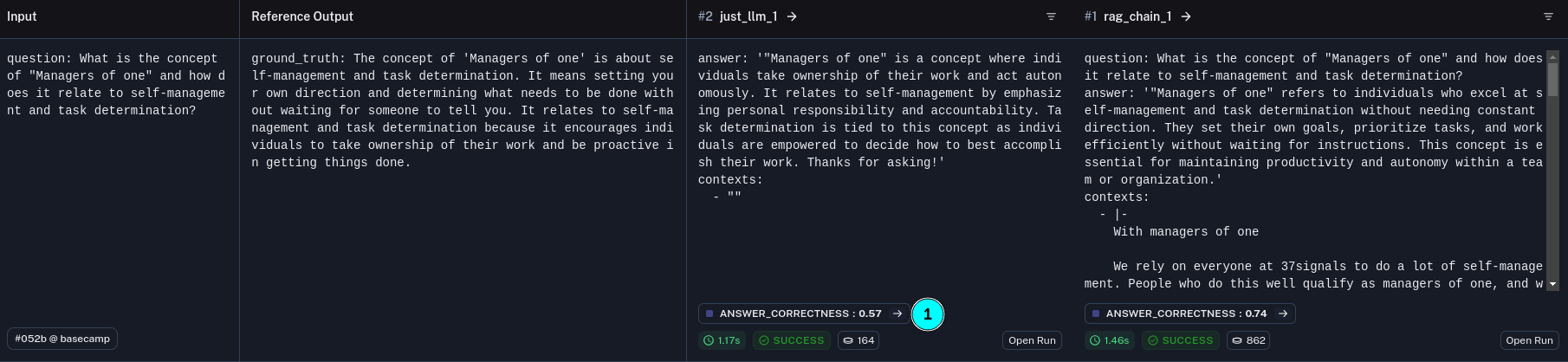
and the full Answer Correctness run

And that is it, in this notebook we
formulated an experiment to compare the performance between just using an LLM and using a RAG pipeline
Chose the appropriate metric for the experiment -
Answer CorrectnessRan the experiments
Analyzed the results and found that RAGs do perform better
These steps are the core of Evaluation Driven Development, and in the next notebook, we will be using the same workflow to optimize our retriever.